
티스토리 뷰
https://developers.openai.com/codex/skills
Agent Skills – Codex | OpenAI Developers
Give Codex new capabilities and expertise
developers.openai.com
AGENTS.md와 Skill 구성 정리
AGENTS.md는 에이전트가 이 저장소를 어떻게 이해하고 행동할지 안내하는 저장소 지침 문서로 사용할 수 있습니다. 다만 skill은 그 안에 들어가는 여러 구성요소 중 하나일 뿐이며, AGENTS.md가 skill이나 subagent를 직접 실행하는 파일은 아닙니다.
AGENTS.md에서 skill 파트는 에이전트에게 “이 리포지터리에서 무엇을 먼저 보고, 어떤 종류의 작업에 어떤 skill을 써야 하는지” 알려주는 라우팅 문서처럼 구성할 수 있습니다.
AGENTS.md의 역할
AGENTS.md는 보통 아래 역할을 맡습니다.
- 이 저장소의 목적을 짧게 설명
- 중요한 디렉터리와 문서 위치를 안내
- 작업 시 지켜야 할 공통 규칙을 제시
- 어떤 상황에서 어떤 skill을 써야 하는지 안내
- 더 자세한 내용은 어디서 찾는지 링크
즉, AGENTS.md는 목차와 작업 라우터 역할을 하는 저장소 지침 문서로 볼 수 있습니다.
Skill의 관점에서 AGENTS.md는 에이전트가 빠르게 판단할 수 있도록 작업 종류, 사용할 skill, 참고 위치를 명확히 연결해 주는 문서로 구성할 수 있습니다.
AGENTS.md 내 Skill 정보 구성 예
repo/
├── AGENTS.md
├── docs/
│   ├── architecture/
│   │   └── index.md
│   ├── operations/
│   │   ├── logging.md
│   │   └── common-errors.md
│   ├── release/
│   │   └── release-process.md
│   └── openai/
│       └── api-guidelines.md
├── .agents/
│   └── skills/
│       ├── log-analyzer/
│       │   ├── SKILL.md
│       │   ├── assets/
│       │   │   └── incident-report.md
│       │   └── references/
│       │       └── log-patterns.md
│       ├── release-checker/
│       │   ├── SKILL.md
│       │   ├── assets/
│       │   │   └── release-report.md
│       │   └── scripts/
│       │       └── check-release.sh
│       └── openai-docs/
│           ├── SKILL.md
│           └── references/
│               └── official-sources.md
└── scripts/
    └── common.sh
공식 문서 기준으로 repo 범위 skill은 skills/가 아니라 .agents/skills/ 아래에 두는 것이 맞습니다.
AGENTS.md 예시
# AGENTS.md

## Purpose
This repository supports IT operations, release validation, and OpenAI API integration work.

## Global Rules
- Prefer repository docs over assumptions.
- Do not guess when logs, specs, or runbooks are available.
- Keep outputs concise and evidence-based.
- State uncertainty explicitly when evidence is incomplete.
- Do not run destructive commands unless explicitly requested.

## Docs Map
- Architecture: docs/architecture/index.md
- Operations logging guide: docs/operations/logging.md
- Common incident patterns: docs/operations/common-errors.md
- Release process: docs/release/release-process.md
- OpenAI usage guidelines: docs/openai/api-guidelines.md

## Task Routing

### Use `log-analyzer`
When the task involves:
- incident investigation
- application or infrastructure logs
- repeated errors
- root cause analysis

First read:
- docs/operations/logging.md
- docs/operations/common-errors.md

Then consider using:
- .agents/skills/log-analyzer/SKILL.md

Expected output:
- symptom summary
- evidence from logs
- likely causes
- next checks

### Use `release-checker`
When the task involves:
- release readiness
- deployment checks
- smoke tests
- post-deploy validation

First read:
- docs/release/release-process.md

Then consider using:
- .agents/skills/release-checker/SKILL.md

Expected output:
- change summary
- checks passed
- checks pending
- risks
- recommendation

### Use `openai-docs`
When the task involves:
- OpenAI API usage
- model selection
- Responses API
- Agents SDK
- official documentation lookup

First read:
- docs/openai/api-guidelines.md

Then consider using:
- .agents/skills/openai-docs/SKILL.md

Expected output:
- question scope
- official answer
- recommended usage
- source

## Output Expectations
- Summaries should be short and scannable.
- Separate verified facts from assumptions or hypotheses.
- Include file paths, logs, or document references when used as evidence.
- For operational issues, prefer:
  - symptom
  - evidence
  - likely cause
  - next action
- For release checks, prefer:
  - scope
  - passed checks
  - pending checks
  - risk
  - recommendation

## Restrictions And Approval Rules
- Do not delete production data, infrastructure, or persistent resources unless explicitly requested.
- Do not run destructive commands unless explicitly approved.
- Do not expose secrets, tokens, credentials, or sensitive user data in outputs.
- Ask for approval before:
  - production changes
  - destructive actions
  - external network access when restricted
  - operations that may affect shared environments
- If a task is blocked by missing approval, stop and report exactly what approval is needed.

## Validation
- Before concluding a task, run the most relevant checks available.
- Prefer repository-defined validation commands over ad hoc checks.
- Typical validation includes:
  - lint
  - unit tests
  - smoke tests
  - log or metric confirmation
- If validation was not run, state that clearly.
- If a change increases risk, explain the remaining risk briefly.

## Skill Files
- .agents/skills/log-analyzer/SKILL.md
- .agents/skills/release-checker/SKILL.md
- .agents/skills/openai-docs/SKILL.md
여기서 Task Routing은 어떤 상황에서 어떤 skill을 고려할지 안내하고, Output Expectations는 결과 형식을 정리하며, Restrictions And Approval Rules는 허용 범위를 제한하고, Validation은 마무리 전에 무엇을 확인할지 정리합니다.
참고용 한글 버전
# AGENTS.md

## 목적
이 저장소는 IT 운영, 릴리스 검증, OpenAI API 연동 작업을 지원합니다.

## 전역 규칙
- 추정보다 저장소 내 문서를 우선합니다.
- logs, specs, runbooks가 있는 경우 추측하지 않습니다.
- 출력은 간결하고 근거 중심으로 작성합니다.
- 근거가 불충분하면 불확실성을 명시합니다.
- 명시적으로 요청되지 않은 파괴적 명령은 실행하지 않습니다.

## 문서 맵
- 아키텍처: docs/architecture/index.md
- 운영 로그 가이드: docs/operations/logging.md
- 공통 장애 패턴: docs/operations/common-errors.md
- 릴리스 프로세스: docs/release/release-process.md
- OpenAI 사용 가이드: docs/openai/api-guidelines.md

## 작업 라우팅

### `log-analyzer` 사용
다음과 같은 작업일 때 고려합니다:
- 장애 조사
- 애플리케이션 또는 인프라 로그 분석
- 반복 오류 분석
- 근본 원인 분석

먼저 읽을 문서:
- docs/operations/logging.md
- docs/operations/common-errors.md

그다음 고려할 skill:
- .agents/skills/log-analyzer/SKILL.md

기대 출력:
- 증상 요약
- 로그 근거
- 가능한 원인
- 다음 확인 항목

### `release-checker` 사용
다음과 같은 작업일 때 고려합니다:
- 릴리스 준비 상태 점검
- 배포 점검
- 스모크 테스트
- 배포 후 검증

먼저 읽을 문서:
- docs/release/release-process.md

그다음 고려할 skill:
- .agents/skills/release-checker/SKILL.md

기대 출력:
- 변경 요약
- 완료된 점검 항목
- 미완료 점검 항목
- 리스크
- 권고 사항

### `openai-docs` 사용
다음과 같은 작업일 때 고려합니다:
- OpenAI API 사용
- 모델 선택
- Responses API
- Agents SDK
- 공식 문서 조회

먼저 읽을 문서:
- docs/openai/api-guidelines.md

그다음 고려할 skill:
- .agents/skills/openai-docs/SKILL.md

기대 출력:
- 질문 범위
- 공식 답변
- 권장 사용 방식
- 출처

## 출력 기대치
- 요약은 짧고 빠르게 훑어볼 수 있어야 합니다.
- 검증된 사실과 가정 또는 가설을 구분해서 작성합니다.
- 근거로 사용한 파일 경로, 로그, 문서 참조를 포함합니다.
- 운영 이슈는 가능하면 다음 형식을 따릅니다:
  - 증상
  - 근거
  - 가능한 원인
  - 다음 조치
- 릴리스 점검은 가능하면 다음 형식을 따릅니다:
  - 범위
  - 완료된 점검
  - 미완료 점검
  - 리스크
  - 권고 사항

## 제한 및 승인 규칙
- 명시적으로 요청되지 않은 한 운영 데이터, 인프라, 영속 자원을 삭제하지 않습니다.
- 명시적으로 승인되지 않은 파괴적 명령은 실행하지 않습니다.
- 출력에 비밀정보, 토큰, 자격증명, 민감한 사용자 데이터를 노출하지 않습니다.
- 다음 작업 전에는 승인을 받아야 합니다:
  - 운영 환경 변경
  - 파괴적 작업
  - 제한된 환경에서의 외부 네트워크 접근
  - 공유 환경에 영향을 줄 수 있는 작업
- 승인 부족으로 작업이 막히면, 어떤 승인이 필요한지 정확히 보고하고 중단합니다.

## 검증
- 작업을 마무리하기 전에 가능한 가장 적절한 검증을 수행합니다.
- 임의 검증보다 저장소에 정의된 검증 명령을 우선합니다.
- 일반적인 검증 항목은 다음과 같습니다:
  - 린트
  - 단위 테스트
  - 스모크 테스트
  - 로그 또는 메트릭 확인
- 검증을 수행하지 못했다면 그 사실을 명확히 밝힙니다.
- 변경으로 인해 리스크가 증가한다면 남아 있는 리스크를 짧게 설명합니다.

## 스킬 파일
- .agents/skills/log-analyzer/SKILL.md
- .agents/skills/release-checker/SKILL.md
- .agents/skills/openai-docs/SKILL.md
예시 .agents/skills/log-analyzer/SKILL.md
공식 문서 기준으로 skill은 디렉터리 단위이며 SKILL.md가 필요하고, SKILL.md에는 최소한 name과 description이 있어야 합니다. 아래 예시는 그 형식에 맞춘 버전입니다.
---
name: log-analyzer
description: Use this skill for log analysis, incident investigation, repeated failures, or root cause analysis from logs.
---

## Purpose
Analyze logs and identify the most likely cause of an incident.

## Inputs
- log files
- log query results
- error messages
- recent deployment context

## Procedure
1. Identify the affected service and time range.
2. Collect the most relevant error logs first.
3. Group repeated error patterns.
4. Check whether a deployment or config change happened near the failure time.
5. List up to 3 likely causes with evidence.
6. If evidence is weak, mark it explicitly as a hypothesis.
7. Produce the final report using the incident template.

## Tools
- `rg`
- `kubectl logs`
- `git log`

## Output Format
- Symptom
- Evidence
- Likely causes
- Next checks

## References
- `references/log-patterns.md`
- `assets/incident-report.md`

## Guardrails
- Do not claim root cause without evidence.
- Do not omit time range or affected component.
- Prefer exact log lines over vague summaries.
한글 번역 예시:
---
name: log-analyzer
description: 로그 분석, 장애 조사, 반복 실패 분석, 또는 로그 기반 근본 원인 분석이 필요할 때 이 skill을 사용합니다.
---

## Purpose
로그를 분석하고 장애의 가장 가능성 높은 원인을 식별합니다.

## Inputs
- 로그 파일
- 로그 조회 결과
- 오류 메시지
- 최근 배포 관련 문맥

## Procedure
1. 영향을 받은 서비스와 시간 범위를 식별합니다.
2. 가장 관련성이 높은 오류 로그를 먼저 수집합니다.
3. 반복되는 오류 패턴을 그룹화합니다.
4. 장애 시점 근처에 배포나 설정 변경이 있었는지 확인합니다.
5. 근거와 함께 최대 3개의 가능한 원인을 정리합니다.
6. 근거가 약하면 가설임을 명시합니다.
7. 장애 보고서 템플릿을 사용해 최종 보고서를 작성합니다.

## Tools
- `rg`
- `kubectl logs`
- `git log`

## Output Format
- 증상
- 근거
- 가능한 원인
- 다음 확인 항목

## References
- `references/log-patterns.md`
- `assets/incident-report.md`

## Guardrails
- 근거 없이 근본 원인을 단정하지 않습니다.
- 시간 범위나 영향받은 컴포넌트를 빠뜨리지 않습니다.
- 모호한 요약보다 정확한 로그 라인을 우선합니다.
아래 두 파일은 역할을 나눠서 구성하면 됩니다.
- assets/incident-report.md: 에이전트가 결과를 정리할 때 따르는 출력 템플릿
- references/log-patterns.md: 자주 나오는 로그 유형과 해석 기준을 담는 참고 자료
즉, assets/incident-report.md는 어떻게 보고할지, references/log-patterns.md는 로그를 어떻게 읽을지에 초점을 둡니다.
assets/incident-report.md 예시
# Incident Report Template

## 1. Incident Summary
- Service:
- Time range:
- Severity:
- User impact:

## 2. Symptoms
- Main symptom:
- First detected at:
- Repeated or one-time:

## 3. Evidence
### Key log lines
- `[timestamp]` message
- `[timestamp]` message

### Related metrics or traces
- metric:
- abnormal value:
- trace/span:

## 4. Likely Causes
### Cause 1
- Description:
- Evidence:
- Confidence: High / Medium / Low

### Cause 2
- Description:
- Evidence:
- Confidence: High / Medium / Low

### Cause 3
- Description:
- Evidence:
- Confidence: High / Medium / Low

## 5. Scope of Impact
- Affected services:
- Affected users:
- Affected features:

## 6. Open Questions
- Question 1:
- Question 2:

## 7. Recommended Next Checks
- Check 1:
- Check 2:
- Check 3:

## 8. Notes
- Hypotheses must be labeled clearly.
- Do not claim root cause without evidence.
- Prefer exact file names, timestamps, and log snippets.
한글 번역 예시:
# 장애 보고서 템플릿

## 1. 장애 요약
- 서비스:
- 시간 범위:
- 심각도:
- 사용자 영향:

## 2. 증상
- 주요 증상:
- 최초 감지 시각:
- 반복 발생 여부:

## 3. 근거
### 핵심 로그 라인
- `[timestamp]` 메시지
- `[timestamp]` 메시지

### 관련 메트릭 또는 트레이스
- 메트릭:
- 비정상 값:
- trace/span:

## 4. 가능한 원인
### 원인 1
- 설명:
- 근거:
- 신뢰도: 높음 / 중간 / 낮음

### 원인 2
- 설명:
- 근거:
- 신뢰도: 높음 / 중간 / 낮음

### 원인 3
- 설명:
- 근거:
- 신뢰도: 높음 / 중간 / 낮음

## 5. 영향 범위
- 영향받은 서비스:
- 영향받은 사용자:
- 영향받은 기능:

## 6. 미해결 질문
- 질문 1:
- 질문 2:

## 7. 권장 다음 확인 항목
- 확인 항목 1:
- 확인 항목 2:
- 확인 항목 3:

## 8. 메모
- 가설은 명확하게 표시해야 합니다.
- 근거 없이 근본 원인을 단정하지 않습니다.
- 가능하면 정확한 파일명, 타임스탬프, 로그 조각을 사용합니다.
이 템플릿의 목적은 에이전트가 장애 보고서를 항상 같은 구조로 쓰게 하는 것입니다. 특히 Evidence, Likely Causes, Open Questions를 분리해 두는 것이 중요합니다.
references/log-patterns.md 예시
# Log Patterns Reference

## Purpose
This document helps agents interpret common log patterns during incident investigation.

## 1. Timeout Pattern
### Example
- `upstream request timed out after 3000ms`
- `context deadline exceeded`
- `request timeout`

### Typical Meaning
- upstream dependency is slow or unavailable
- network latency increased
- retry policy may be insufficient

### What to Check
- upstream service health
- recent latency increase
- retry and timeout configuration

## 2. Database Connection Failure
### Example
- `connection refused`
- `too many connections`
- `could not connect to database`

### Typical Meaning
- database is unavailable
- connection pool is exhausted
- configuration or credential issue

### What to Check
- database health
- connection pool metrics
- credential/config changes

## 3. Authentication / Authorization Failure
### Example
- `401 unauthorized`
- `403 forbidden`
- `token expired`
- `invalid signature`

### Typical Meaning
- expired or invalid credentials
- permission misconfiguration
- auth service dependency issue

### What to Check
- token expiry
- auth provider status
- recent permission changes

## 4. Deployment Regression Pattern
### Example
- errors begin immediately after deploy
- new endpoint fails while existing ones succeed
- config-related exceptions after release

### Typical Meaning
- newly introduced bug
- incompatible config change
- missing migration or feature flag issue

### What to Check
- deployment timestamp
- changed files
- config diff
- migration status

## 5. Resource Exhaustion Pattern
### Example
- `out of memory`
- `cpu throttling`
- `disk full`
- `too many open files`

### Typical Meaning
- infrastructure capacity issue
- runaway process
- unexpected traffic spike

### What to Check
- CPU/memory/disk metrics
- traffic increase
- recent workload changes

## 6. Null / Schema / Validation Error
### Example
- `cannot read property of undefined`
- `null pointer`
- `schema validation failed`
- `invalid input`

### Typical Meaning
- unexpected input shape
- missing field
- backward compatibility issue

### What to Check
- request payload changes
- schema changes
- upstream contract mismatch

## Usage Notes
- Do not assume the first matching pattern is the root cause.
- Use patterns as hints, not proof.
- Always confirm with timestamps, affected services, and repeated evidence.
한글 번역 예시:
# 로그 패턴 참고 자료

## Purpose
이 문서는 장애 조사 중 에이전트가 자주 나타나는 로그 패턴을 해석하는 데 도움을 줍니다.

## 1. Timeout Pattern
### Example
- `upstream request timed out after 3000ms`
- `context deadline exceeded`
- `request timeout`

### Typical Meaning
- 상위 의존 서비스가 느리거나 응답 불가 상태일 수 있습니다.
- 네트워크 지연이 증가했을 수 있습니다.
- 재시도 정책이 충분하지 않을 수 있습니다.

### What to Check
- 상위 서비스 상태
- 최근 지연 시간 증가 여부
- 재시도 및 타임아웃 설정

## 2. Database Connection Failure
### Example
- `connection refused`
- `too many connections`
- `could not connect to database`

### Typical Meaning
- 데이터베이스를 사용할 수 없는 상태일 수 있습니다.
- 커넥션 풀이 고갈되었을 수 있습니다.
- 설정 또는 자격 증명 이슈일 수 있습니다.

### What to Check
- 데이터베이스 상태
- 커넥션 풀 메트릭
- 자격 증명 또는 설정 변경 사항

## 3. Authentication / Authorization Failure
### Example
- `401 unauthorized`
- `403 forbidden`
- `token expired`
- `invalid signature`

### Typical Meaning
- 자격 증명이 만료되었거나 유효하지 않을 수 있습니다.
- 권한 설정이 잘못되었을 수 있습니다.
- 인증 서비스 의존성 이슈일 수 있습니다.

### What to Check
- 토큰 만료 여부
- 인증 제공자 상태
- 최근 권한 변경 사항

## 4. Deployment Regression Pattern
### Example
- errors begin immediately after deploy
- new endpoint fails while existing ones succeed
- config-related exceptions after release

### Typical Meaning
- 새로 유입된 버그일 수 있습니다.
- 호환되지 않는 설정 변경일 수 있습니다.
- 누락된 마이그레이션 또는 feature flag 이슈일 수 있습니다.

### What to Check
- 배포 시각
- 변경된 파일
- 설정 diff
- 마이그레이션 상태

## 5. Resource Exhaustion Pattern
### Example
- `out of memory`
- `cpu throttling`
- `disk full`
- `too many open files`

### Typical Meaning
- 인프라 용량 문제일 수 있습니다.
- 비정상 프로세스가 자원을 과다 사용 중일 수 있습니다.
- 예상치 못한 트래픽 급증일 수 있습니다.

### What to Check
- CPU/메모리/디스크 메트릭
- 트래픽 증가 여부
- 최근 워크로드 변화

## 6. Null / Schema / Validation Error
### Example
- `cannot read property of undefined`
- `null pointer`
- `schema validation failed`
- `invalid input`

### Typical Meaning
- 예상과 다른 입력 형태일 수 있습니다.
- 필드가 누락되었을 수 있습니다.
- 하위 호환성 이슈일 수 있습니다.

### What to Check
- 요청 페이로드 변경 사항
- 스키마 변경 사항
- 상위/하위 시스템 간 계약 불일치

## Usage Notes
- 처음 일치한 패턴을 바로 근본 원인으로 단정하지 않습니다.
- 패턴은 단서로 사용하되, 증거로 간주하지 않습니다.
- 항상 타임스탬프, 영향받은 서비스, 반복된 근거로 확인합니다.
.agents/skills/release-checker/SKILL.md
---
name: release-checker
description: Use this skill for release validation, deployment readiness checks, smoke tests, or post-deploy review.
---

## Purpose
Validate release readiness and summarize deployment risk.

## Procedure
1. Review changed files and affected components.
2. Confirm required tests were run.
3. Check deployment prerequisites.
4. Review known risk areas from the release process doc.
5. Summarize passed checks, pending checks, and risks.

## Output Format
- Change summary
- Checks passed
- Checks pending
- Risks
- Recommendation

## Tools
- `git diff`
- `git log`
- local test commands
- `scripts/check-release.sh`

## Guardrails
- Separate verified checks from unchecked items.
- Flag DB migrations, config changes, and infra changes explicitly.
한글 번역 예시:
---
name: release-checker
description: 릴리스 검증, 배포 준비 상태 점검, 스모크 테스트, 또는 배포 후 검토가 필요할 때 이 skill을 사용합니다.
---

## Purpose
릴리스 준비 상태를 검증하고 배포 리스크를 요약합니다.

## Procedure
1. 변경된 파일과 영향을 받는 컴포넌트를 검토합니다.
2. 필요한 테스트가 실행되었는지 확인합니다.
3. 배포 전제 조건을 점검합니다.
4. 릴리스 프로세스 문서에서 알려진 리스크 영역을 확인합니다.
5. 완료된 점검, 미완료 점검, 리스크를 요약합니다.

## Output Format
- 변경 요약
- 완료된 점검
- 미완료 점검
- 리스크
- 권고 사항

## Tools
- `git diff`
- `git log`
- 로컬 테스트 명령
- `scripts/check-release.sh`

## Guardrails
- 검증된 항목과 아직 확인하지 않은 항목을 분리합니다.
- DB 마이그레이션, 설정 변경, 인프라 변경은 명시적으로 표시합니다.
.agents/skills/openai-docs/SKILL.md
---
name: openai-docs
description: Use this skill for OpenAI API questions, model selection, official documentation lookup, or current guidance on Responses API, Agents SDK, and related OpenAI products.
---

## Purpose
Answer OpenAI product and API questions using official documentation.

## Procedure
1. Identify the exact OpenAI product area.
2. Prefer official documentation sources.
3. Extract only the relevant section.
4. Summarize the answer in practical terms.
5. Include links or doc references when needed.

## Output Format
- Question scope
- Official answer
- Recommended usage
- Source

## Guardrails
- Prefer official docs only.
- Do not rely on memory when current docs are required.
- Clearly distinguish facts from inferences.
한글 번역 예시:
---
name: openai-docs
description: OpenAI API 질문, 모델 선택, 공식 문서 조회, 또는 Responses API, Agents SDK 등 관련 최신 가이드가 필요할 때 이 skill을 사용합니다.
---

## Purpose
공식 문서를 사용해 OpenAI 제품 및 API 관련 질문에 답변합니다.

## Procedure
1. 정확한 OpenAI 제품 영역을 식별합니다.
2. 공식 문서 출처를 우선합니다.
3. 필요한 관련 섹션만 추출합니다.
4. 실무적으로 이해하기 쉽게 요약합니다.
5. 필요하면 링크나 문서 참조를 포함합니다.

## Output Format
- 질문 범위
- 공식 답변
- 권장 사용 방식
- 출처

## Guardrails
- 공식 문서만 우선 사용합니다.
- 최신 문서가 필요한 경우 기억에 의존하지 않습니다.
- 사실과 추론을 명확히 구분합니다.
정리
AGENTS.md는 언제 어떤 skill을 고려할지 안내하는 저장소 지침 문서로 쓸 수 있습니다. 각 SKILL.md는 그 작업을 어떻게 수행할지 설명합니다. docs/는 배경지식, references/는 참고 자료, assets/는 템플릿이나 리소스, scripts/는 반복 작업 자동화에 사용합니다.
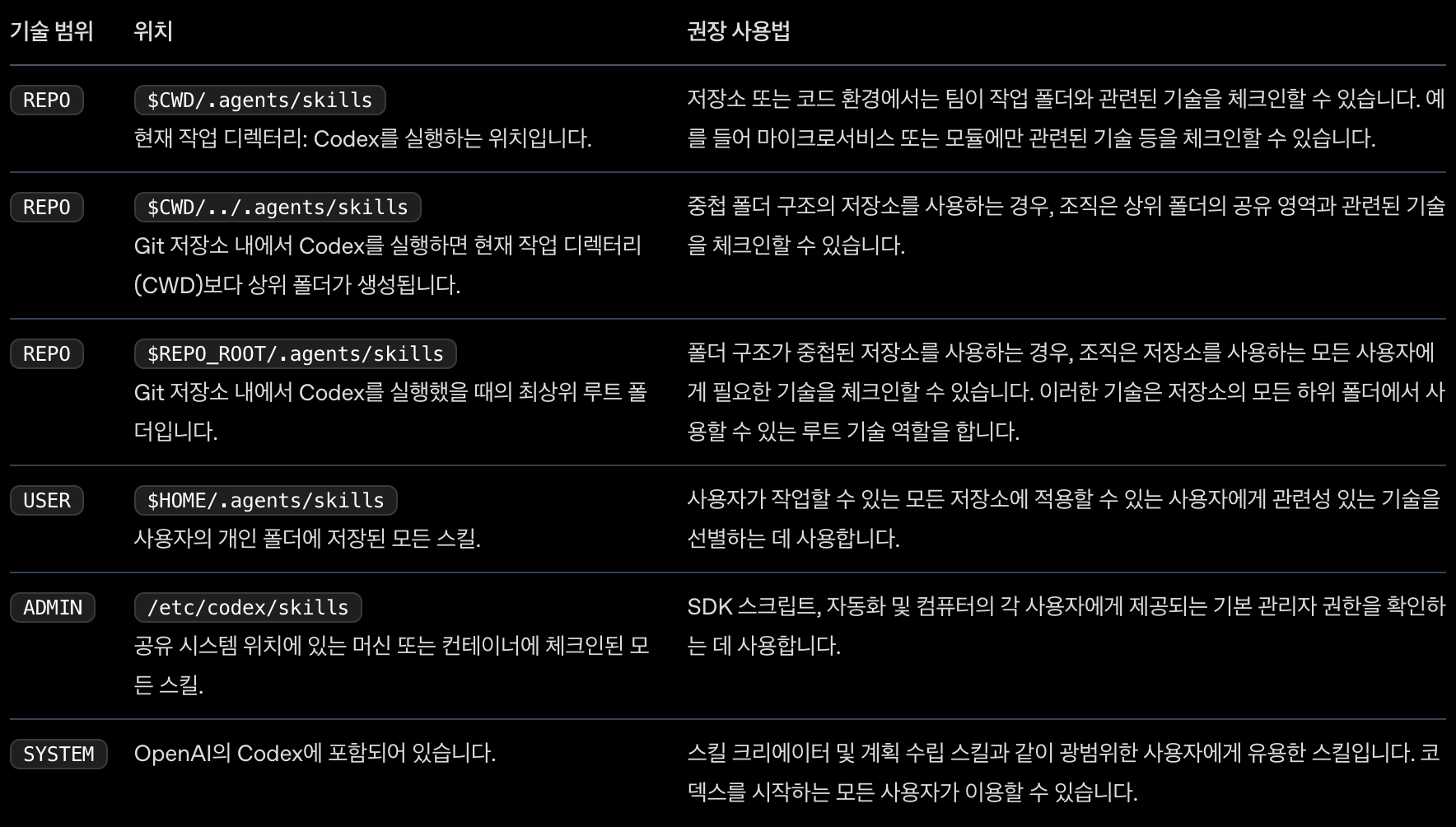
skill 등록 위치에 따른 적용 범위
'AI ML' 카테고리의 다른 글
| 하네스 엔지니어링 - 클로드(CLAUDE) 기초 1. 에이전트 정의 (0) | 2026.04.23 |
|---|---|
| 하네스 엔지니어링 5 - CODEX : 서브 에이전트(Sub Agent) (0) | 2026.04.22 |
| 하네스 엔지니어링 3 - 하위 집합 (1) | 2026.04.22 |
| 하네스 엔지니어링 2 (1) | 2026.04.22 |
| 하네스 엔지니어링 1 (1) | 2026.04.16 |
- Total
- Today
- Yesterday
- dsl
- 스프링
- deployment
- Single
- ClassDiagram
- docker
- 내부회계통제
- k8s
- ES6 #http-server #node.js #vue.js
- 크롬 단축키
- 성능최적화기법 #성능최적화패턴 #성능튜닝
- rxjava
- ITGC
- Nginx
- AWS
- JIRA 워크플로우 Workflow
- 맥 #인쇄옵션 #양면인쇄 #단면인쇄
- spring
- Jenkins
- 쿠버네티스
- istio
- kubernetes
- Kubeconfig
- Linux
- Domain Specific Language
| 일 | 월 | 화 | 수 | 목 | 금 | 토 |
|---|---|---|---|---|---|---|
| 1 | 2 | 3 | 4 | 5 | 6 | |
| 7 | 8 | 9 | 10 | 11 | 12 | 13 |
| 14 | 15 | 16 | 17 | 18 | 19 | 20 |
| 21 | 22 | 23 | 24 | 25 | 26 | 27 |
| 28 | 29 | 30 |